Someone asked me for help to import translations to their personalized trait. Here I can give you a little tutorial on how to do it:
First open Sim 4 Studio and enter my projects:
Now we look for the file to which we want to add a translation, in our case SimmerSarah_VainTrait
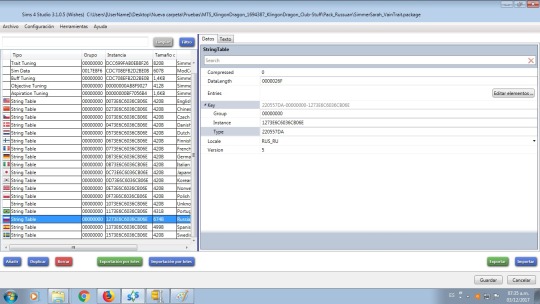
As we can see in the image, we select the Russian language on the left and press to import down to the right.
Now let’s import the Russian language to the file. There
are 2 options: .binary files which are text strings exported by Sims 4
Studio and .stlb files which are files that are taken from programs such
as TS4 STBL Editor.
As we see in the image only the .binary files are shown, if our file is .stbl it will not be displayed.
If our translation is .binary we omit the next step if it is in .stbl format see the following image.
Now
our translation is in .stbl format and we can not see it so we do the
following: in the part below and to the left where we can choose what
type of file we are going to open, we choose “All Filetype (*. *)“
As we can see in the image above, we can see our translation in .stbl format. So
if the translation is in .binary format we only import selecting the
file in our case called SimmerSarah_VainTrait_Russian.binary then we
press the import option in the left part (in blue).
If
the file was in .stbl format then we do the previous step and then we
choose in our case S4_220557DA_00000000_1273E6C6036CB06E %% + STBL.stbl
then we press the import option in the left part (in blue).
Once they have pressed import and refresh the image (change to another translation and return). So as you can see in the image below we already have our translation in Russian.
Press save and exit. They already have their translation in Russian, I hope it helped you in something.




 Havemnet