I made it my goal today to mix Dean’s ‘sex is’ speech from Rock and a Hard Place with all the best audio of him breathing heavily and grunting and basically making pornographic sound effects and well… this happened.
Put headphones on, hide the children, turn off the lights, and enjoy.
Not our usual, but oh dear lord…
-T
Dude…yes
I’m blushing right now, and I can’t stop smiling and giggling.
I need a moment. Christ all sweet fuck, maybe two.
I’ve seen this before and I love it but ideally Thunderstruck would not be playing in the background and I could focus my full attention on the grunting.
Sweet fuck and all that is holy. My god. How to make a smut writer blush: THIS. my god. My 4 year old asked me what was wrong. I’m…I’m not okay after that. misswhizzyrizlow1 have you heard this? Because, damn. I need a moment.
Sweetie, I have this in my iTunes! 😀 It is great inspiration!
And BTW, there’s a Sam version, too 😀
The. Greatest. Audio. Ever. Made.
Oh. My. Sweet. Castiel. I had forgotten how very HOT that is.
I should let this play when I write. Does anyone have the Sam version? I need it for scientific purposes…because I’m a writer and we do research. Yes research.
Sweet Christ on a crutch… I’m at work right now, people. I’m trying to be academic and instead I’m dying…
twofriesshortofhomicide – can we get some of your best Dean Extreme Distress or Stellar Blowjob moments for visual reference?
YASSSSSSSS
For the love of all that is holy…
(THROWBACK YA’LL) ((extremely nsfw audio but omg))
Someone asked me for help to import translations to their personalized trait. Here I can give you a little tutorial on how to do it:
First open Sim 4 Studio and enter my projects:
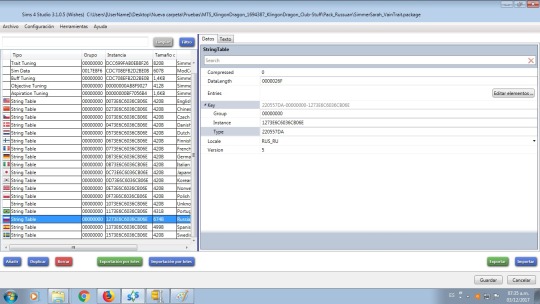
Now we look for the file to which we want to add a translation, in our case SimmerSarah_VainTrait
As we can see in the image, we select the Russian language on the left and press to import down to the right.
Now let’s import the Russian language to the file. There
are 2 options: .binary files which are text strings exported by Sims 4
Studio and .stlb files which are files that are taken from programs such
as TS4 STBL Editor.
As we see in the image only the .binary files are shown, if our file is .stbl it will not be displayed.
If our translation is .binary we omit the next step if it is in .stbl format see the following image.
Now
our translation is in .stbl format and we can not see it so we do the
following: in the part below and to the left where we can choose what
type of file we are going to open, we choose “All Filetype (*. *)“
As we can see in the image above, we can see our translation in .stbl format. So
if the translation is in .binary format we only import selecting the
file in our case called SimmerSarah_VainTrait_Russian.binary then we
press the import option in the left part (in blue).
If
the file was in .stbl format then we do the previous step and then we
choose in our case S4_220557DA_00000000_1273E6C6036CB06E %% + STBL.stbl
then we press the import option in the left part (in blue).
Once they have pressed import and refresh the image (change to another translation and return). So as you can see in the image below we already have our translation in Russian.
Press save and exit. They already have their translation in Russian, I hope it helped you in something.
Hey guys – just wanted to announce that I’m now open to commissions.
Motivation to make custom content has been at an all time low for me in the last couple of months, and perhaps this might help me get back into the groove while giving you something you want to use in your game!
This does not mean I’m going to stop creating and releasing CC for free for everyone; that will continue to happen. This is totally optional, and meant for those who want to support me and get something in return!
If you have any questions regarding this, feel free to send me an ask or an email.
Hello, fellow Simmers, I met Brittany ( @brittpinkiesims ) last year and she inspired me to mod, and helped me a lot throughout the time!
However, Brittany is on hiatus and therefore cannot update her mods, therefore, I asked if I could update her mods for fellow Simmers, and she replied:
So…I did.
The following mods are fixed by me:
Fashion Career
Funeral Mod
Graduation Mod
Harry Potter Traits
Her other mods are up to date, to my knowledge(I’m using them myself!) . Spread the word if you can, as Brittany won’t be back in the near future 😦 and I know a lot of Simmers want her mods to be up to date.
The new versions of Studio both contain the following:
CAS batch fix for garments that become distorted when larger Sims wear them
A more comprehensive sofa and loveseat batch fix
A batch fix for outdoor benches (2 and 3 seaters)
A batch fix for 6-seat dining tables
Updates to CAS meshing for pets to take care of a problem with seams and splits in new pets CAS meshes.
New skins for the pets in Studio’s model viewer (thanks Feyona!)
Download the newest beta versions HERE. Each version’s changelog is in the same post as the download.
News:
At this point, a batch-fix for counters is in the works but not yet implemented. Other than that, all issues for which an example .package was sent have been batch-fixed.
If you are aware of other categories of items that need a batch fix, please feel welcome to let us know in THIS THREAD. Please note, to make a batch fix, an example of a broken item is needed.




 Havemnet